


ClevCalc - Calculator
4.621.19K Reviews
App Specs
- Version
- 2.24.12
- Updated On
- License
- Free
- Downloads
- 100,000,000+
- Developer
- Cleveni Inc.
- Categories
- Productivity
- Platform
- Android, iOS
Screenshots
 Analysis by AppCompare
In a shared household, a calculator often gets passed around for small decisions: splitting groceries, checking a sale price, or working out how much fuel a trip might use. I like that ClevCalc - Calculator can cover several of those jobs without asking everyone to switch between separate tools. It is a free productivity app from Cleveni Inc., and its appeal is practical rather than flashy: one place to handle everyday sums and a range of specialized calculations.
One phone, several kinds of calculations
Picture a quick supermarket stop with another person. One of you compares the unit price of two packages, the other checks a discount, and then you work out a fair share of the total. ClevCalc’s basic calculator and discount and tip tools suit that kind of stop-and-check routine. The benefit is not that every household task becomes automatic; it is that you can move between different kinds of arithmetic without hunting for another app.
That convenience also helps when a calculation has a few steps. I would use the regular calculator for the arithmetic I want to inspect myself, then open a purpose-built tool when the question is more specific, such as a loan payment or fuel cost. Keeping those jobs separate reduces the chance of mixing assumptions into a quick mental calculation. For anything important, I still check the inputs before relying on the result.
Shared use without shared assumptions
A useful household habit is to treat the app as a shared calculator, not as a shared record-keeping system. If someone works out a bill split, they should say what they entered—number of people, tip, or discount—so the result makes sense to everyone. The app helps with the arithmetic, but people still need to agree on what should be included.
This distinction matters with tools such as the currency converter and loan calculator. An exchange-rate result can help with a quick comparison while shopping, but it should not be treated as a guaranteed checkout amount. Likewise, a loan estimate is useful for exploring a payment scenario, not a substitute for checking the lender’s terms and fees. I find these calculators most helpful as a first pass: they make a question easier to frame before anyone makes a decision.
Good boundaries for a family phone
If the app is installed on a device used by more than one person, I would keep the setup simple and avoid assuming that another household member will use the same settings or interpretation. A theme is a personal preference, while a number entered into a calculator is only meaningful when the inputs are clear. Before handing the phone over, it is worth showing a younger user which tool to open and how to check the figures they enter.
ClevCalc is rated for Everyone, so its everyday calculation focus is suitable for a broad audience. That age label does not replace adult guidance when a child is using financial tools or interpreting health-related calculations. I would explain that a result can be mathematically useful without being professional advice. For a shared device, that small conversation is more valuable than expecting a calculator to set boundaries for the family.
Worth Reading Before You Choose

Flipboard Shows What News Apps Must Do Beyond the Feed

Switching to Android Auto Means Rethinking Your Driving Routine

Google Calendar Makes a Crowded Week Easier to Manage

Ludo King Makes the Most of the Minutes Between Plans

Baby Panda World Brings Quick Play to Modern Phones, but Its Game Library Feels Busy

ESPN’s Live Game View Makes Following Close Games Easier
First Impressions and Interface
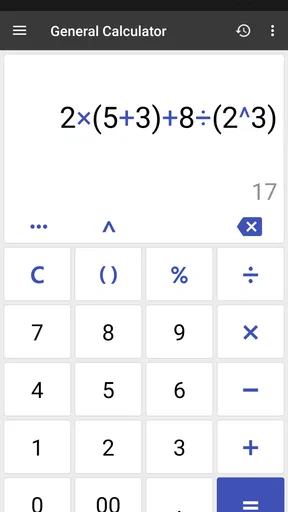
Right from the get-go, ClevCalc - Calculator impresses with its sleek and straightforward interface. It's designed to be user-friendly, perfect for those who aren't exactly tech-savvy. The app opens directly to a standard calculator screen, but don't let that fool you. Beneath this simple exterior lies a powerhouse of features.
The app is visually appealing with a clean design. Buttons are well-spaced, making it super easy to use even on smaller screens. Plus, it offers a variety of themes, so you can customize the look to match your mood or style. Who knew calculators could be this chic?
Diving Into the Features
Now, let's get to the juicy stuff—what this app can actually do. It’s not just your average calculator. This app is loaded with a plethora of handy features that go beyond basic arithmetic.
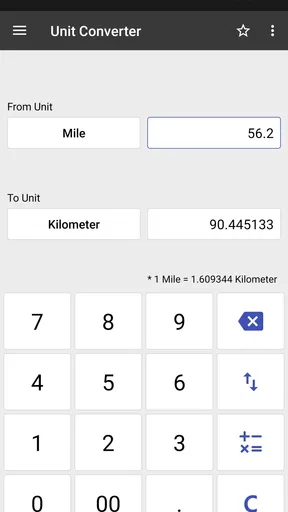
- Unit Converter: Need to convert miles to kilometers, or liters to gallons? ClevCalc has got you covered with its extensive unit converter.
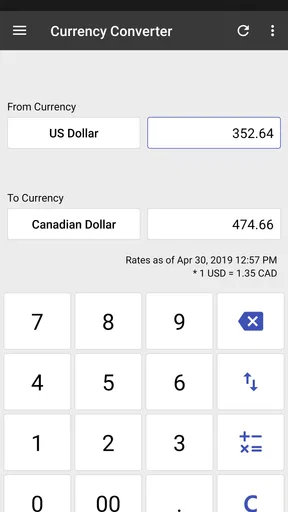
- Currency Converter: With real-time exchange rates, this is a lifesaver for travelers or online shoppers.
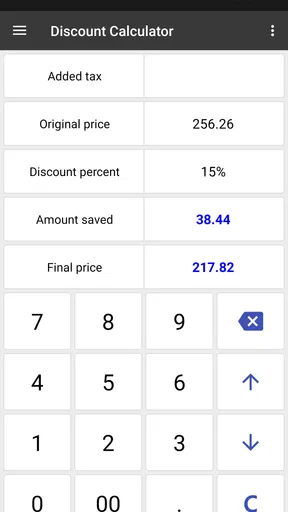
- Discount Calculator: Never struggle with sale prices again. This feature helps you figure out how much you’re actually saving during those irresistible sales.
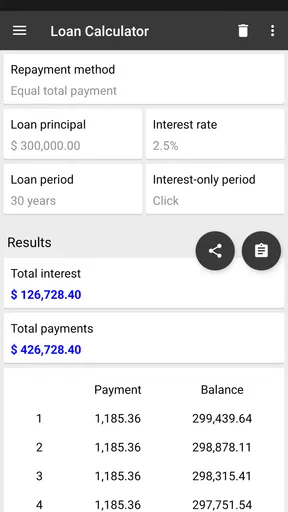
- Loan Calculator: Thinking of taking out a loan? Use this to calculate monthly payments and interest rates, making financial planning a breeze.
- Tip Calculator: Perfect for dining out, it splits the bill and calculates tips effortlessly.
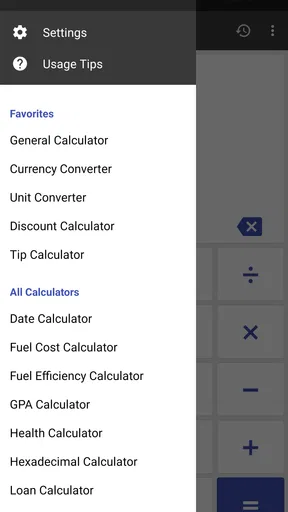
And that’s just scratching the surface! The app also includes features like a health calculator, GPA calculator, and even a fuel cost calculator. It's like having a Swiss army knife of calculators in your pocket.
Where its tools fit into a real routine
The strongest reason to keep ClevCalc around is variety. A student might use the GPA calculator to explore how a possible grade affects an average, then use unit conversion for a science assignment. Someone planning a drive can estimate fuel costs, while a shopper can compare a percentage discount against the price they will actually pay. These are modest tasks, but having the right calculator ready can make them less fiddly.
There is a useful trade-off in using dedicated calculators rather than one long sequence of arithmetic. A discount tool makes the percentage question easier to express, while the ordinary calculator gives more freedom when the operation is unusual. I would choose the specialized tool when its inputs match the question, and the basic calculator when I want to see or control each step. That is a better workflow than assuming one screen is ideal for every calculation.
Where I would slow down and double-check
Specialized results are only as dependable as the values entered. Before trusting a loan estimate, I would verify the rate, term, and any assumptions against the actual offer. For a fuel estimate, I would make sure the distance and consumption figures use compatible units. With a tip split, I would confirm whether the group wants the tip calculated before or after any discount. These checks take little time and prevent a polished result from creating false confidence.
The app’s range can also make it less focused than a dedicated alternative. If I only need basic arithmetic, the calculator already built into a phone is often quicker and avoids adding another app. If I need formal financial records, detailed budgeting, or a carefully documented health calculation, a purpose-built service or professional guidance is a better fit. ClevCalc is most convincing for quick estimates and routine calculations, not as a replacement for those deeper tools.
Choosing it over the usual alternatives
Compared with a standard phone calculator, ClevCalc offers more ways to translate a question into a result: conversions, discounts, tips, loans, fuel costs, and other specialized calculations sit alongside ordinary arithmetic. The built-in calculator wins on simplicity if all you ever do is add, subtract, multiply, or divide. I would not install ClevCalc just to replace that one function unless I expected to use its extra tools.
Compared with separate apps for each task, an all-in-one calculator is easier to keep at hand and less likely to make a small errand turn into an app search. The compromise is that a dedicated currency or finance app may be a better choice for someone who needs a more specific workflow. ClevCalc’s currency conversion is handy for a rough comparison, but I would check the final amount at the point of purchase because exchange rates and transaction terms can affect what is charged.
Access, version, and practical expectations
The app has been available since January 13, 2013, and its current version is 2.24.12. It has a 4.6 average from around 1.2 million ratings, with roughly 21,000 written reviews and over 100 million installs. Those figures suggest it has become a familiar option for many people, but popularity alone does not determine whether its collection of tools suits your habits.
ClevCalc is free to download, with in-app purchases ranging from $2.99 to $24.99 per item. I would start with the free experience and decide whether the available tools are useful before considering a purchase. It is available on Android and iOS, and the stated minimum Android requirement is version 8.0. If you are setting it up on an older device, checking the operating-system version first can save an unnecessary install attempt.
One question people often have is whether it is better for quick answers or ongoing planning. In my view, it is better for the former: a one-off conversion, an estimate, or a calculation at the point of decision. For tracking spending over time, saving household budgets, or keeping a formal record of calculations, I would use an app designed around those tasks instead. That distinction keeps expectations realistic and makes ClevCalc easier to appreciate for what it does well.
Performance and Usability
Performance-wise, ClevCalc is smooth and responsive. It handles tasks swiftly without any noticeable lag, which is crucial for an app you might rely on throughout the day. The app’s functionality is intuitive, so you don’t have to spend ages figuring out how to use it. Each feature is easy to access and use, making it ideal for quick on-the-go calculations.
Another aspect worth mentioning is the app’s small footprint. It doesn’t take up much space on your device, which is great if you're juggling storage on your phone. Also, it’s available both on Android and iOS, ensuring a seamless experience across different devices.
Who should keep it handy
I think ClevCalc makes the most sense for people who regularly switch between everyday arithmetic and practical side calculations. Students, frequent shoppers, travelers comparing units, and anyone who often splits bills can get more out of it than someone who rarely needs anything beyond a basic sum. It also suits a household that shares a device, provided each person checks the entries rather than treating another person’s result as self-explanatory.
I would skip it if you prefer a minimalist phone, already have a calculator that covers your needs, or want a specialist tool for detailed financial or health decisions. Its broad selection is convenient, but more options do not automatically make a calculation more trustworthy. The best results come when you know what question you are asking and can verify the values that go into it.
Final Thoughts
So, is ClevCalc worth downloading? Absolutely! Whether you're a student, professional, or just someone who needs a reliable calculator app, ClevCalc has something for everyone. Its extensive range of features, coupled with an easy-to-use interface, makes it a must-have app. Plus, the ability to customize its appearance is a nifty bonus.
In a world where versatility is key, this app stands out by being more than just a calculator. It’s an all-in-one solution that simplifies tasks, saves time, and makes calculations a breeze. So why not give it a try? You might just find yourself wondering how you ever managed without it!
Pros
- User-friendly interface
- easy to navigate.
- Supports a wide range of calculations.
- Offers currency conversion feature.
- Includes unit converter for versatility.
- Ad-free premium version available.
Cons
- Ads in free version can be intrusive.
- Some features require in-app purchases.
- Limited customization options.
- Occasional crashes reported by users.
- No dark mode for nighttime use.
FAQs for ClevCalc - Calculator
What features does ClevCalc offer beyond basic calculations?
ClevCalc goes beyond basic arithmetic, offering a wide array of specialized calculators. Users can access currency conversion, unit conversion, and even a health calculator. There's also a discount calculator for shopping, a date calculator, and a variety of financial calculators. This makes it a versatile tool for daily and professional use.
Is ClevCalc user-friendly for people who aren’t tech-savvy?
Yes, ClevCalc is designed with user-friendliness in mind. The interface is intuitive, featuring clear categories and easy navigation. Users can quickly switch between different calculators without needing a steep learning curve, making it ideal for both tech enthusiasts and those less comfortable with technology.
Does ClevCalc require an internet connection to function?
ClevCalc functions primarily offline, which is convenient for users who need calculations on the go. However, features like currency conversion require an internet connection to fetch the latest exchange rates. This ensures that users receive accurate, up-to-date information when using these specific tools.
Are there any in-app purchases or advertisements in ClevCalc?
ClevCalc is available as a free app, but it includes advertisements. Users who prefer an ad-free experience can opt for in-app purchases to remove these ads. This provides flexibility, allowing users to choose between a free version with ads or a premium experience.
Is ClevCalc suitable for professional use in fields like finance or engineering?
ClevCalc is suitable for both personal and professional use. It offers financial calculators for loans and investments, as well as unit converters beneficial for engineering tasks. While it may not replace specialized software, its comprehensive features make it a great supplementary tool for professionals.


